
AI Document Chatbot
Intelligent document processing with natural language conversations
Project Overview
What is it?
An intelligent document processing chatbot that can analyze PDFs, Word documents, and text files to provide contextual answers and insights through natural language conversations. The system uses advanced AI techniques including vector embeddings and semantic search to understand document content and respond to user queries intelligently.
The chatbot can handle multiple document types, extract meaningful information, and provide accurate responses based on the uploaded content. It's designed to be a powerful tool for document analysis, research assistance, and information retrieval.
Key Features
- ✓ Multi-format document support (PDF, DOCX, TXT)
- ✓ Intelligent text extraction and processing
- ✓ Vector-based semantic search
- ✓ Natural language conversation interface
- ✓ Real-time document analysis and insights
- ✓ Responsive web interface
Technical Implementation
Architecture
Document Processing Pipeline
Documents are processed through a multi-stage pipeline: extraction → chunking → embedding → storage
Vector Database
ChromaDB stores document embeddings for efficient semantic search and retrieval
Web Interface
Flask-based web application with real-time chat interface and document upload capabilities
Key Technologies
AI/ML Stack
Sentence Transformers for embeddings, semantic similarity for intelligent matching
Document Processing
PyPDF2 for PDF extraction, python-docx for Word documents, comprehensive text processing
Backend Framework
Flask web framework with RESTful API design and efficient request handling
Code Structure
agentchatbot/
├── document_processor.py    # Core document processing logic
├── main.py                 # Flask application entry point
├── templates/
│   └── chat.html          # Web interface template
├── documents/             # Sample documents for testing
├── processed/             # Processed document storage
└── requirements.txt       # Python dependencies
Features & Capabilities
Document Processing
Supports PDF, Word documents, and text files with intelligent text extraction and formatting preservation.
AI-Powered Search
Vector-based semantic search using sentence transformers for contextually relevant responses.
Natural Conversations
Intuitive chat interface that understands natural language queries and provides contextual answers.
Real-time Processing
Fast document upload and processing with immediate availability for querying and analysis.
Smart Insights
Extracts key information and provides intelligent insights based on document content and context.
Document Analytics
Comprehensive document summary and analytics with processing statistics and metadata tracking.
Application Screenshots
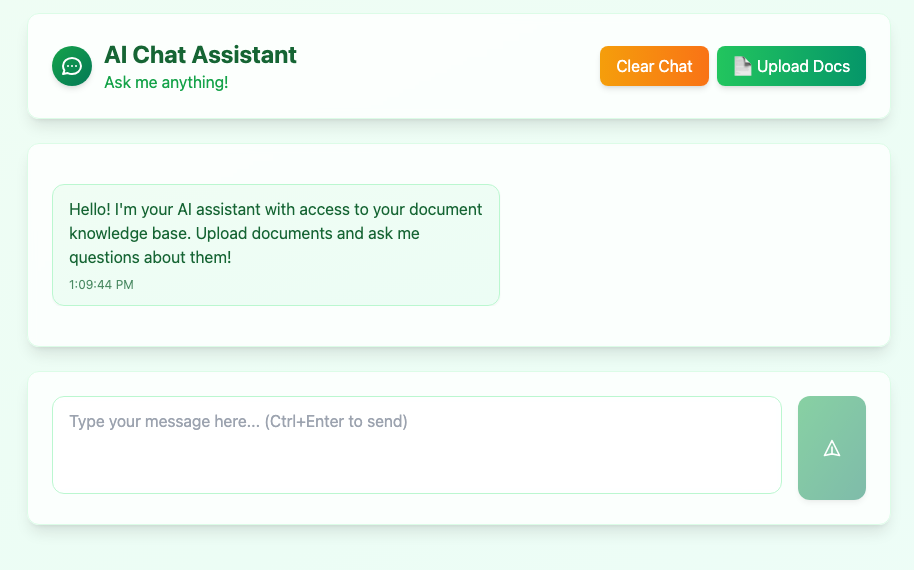
Home Interface - Document Upload & Chat
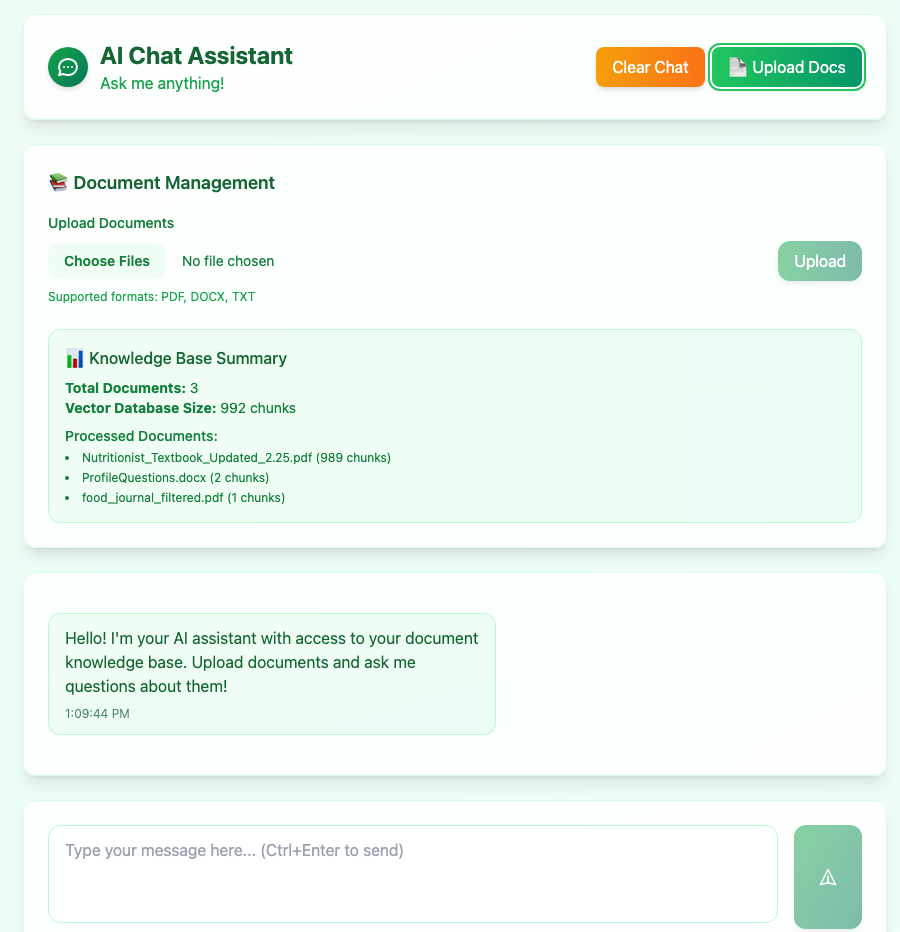
File Processing & Document Analysis
Development Process
Research & Planning
Researched vector databases, document processing libraries, and AI embedding techniques. Designed the architecture for efficient document processing and retrieval.
Core Development
Built the document processor with support for multiple file formats, implemented vector embedding system using ChromaDB, and created the Flask web application.
Testing & Optimization
Tested with various document types, optimized embedding generation, and refined the chat interface for better user experience and response accuracy.
Deployment & Documentation
Set up the application for local deployment, created comprehensive documentation, and prepared the codebase for open-source contribution.
Challenges & Solutions
Key Challenges
-
⚠
Dependency Conflicts: Managing compatibility between sentence-transformers, huggingface-hub, and transformers libraries
-
⚠
Document Processing: Handling different file formats and extracting meaningful text content
-
⚠
Vector Search: Implementing efficient semantic search with proper chunking and embedding
-
⚠
Performance Optimization: Balancing processing speed with accuracy and memory usage
Solutions Implemented
-
✓
Version Management: Resolved dependency conflicts by using compatible versions and proper installation strategies
-
✓
Multi-format Support: Implemented robust document processors for PDF, DOCX, and TXT files
-
✓
Efficient Search: Used ChromaDB for vector storage and implemented smart chunking strategies
-
✓
Optimized Architecture: Designed modular system with efficient processing pipeline and caching
Future Enhancements
Planned Features
- 🔮 Multi-language document support
- 🔮 Advanced document summarization
- 🔮 User authentication and document privacy
- 🔮 Integration with cloud storage services
- 🔮 Real-time collaborative document analysis
Technical Improvements
- ⚡ Enhanced vector search algorithms
- ⚡ Improved document processing speed
- ⚡ Better memory management and caching
- ⚡ Advanced error handling and logging
- ⚡ Scalable microservices architecture